About the project
My team of 4 computing students and I were tasked with enhancing a basic command line interface (CLI) desktop application, AddressBook 3 (AB3),
for our software engineering project. We had chose to modify it into a food diary application known as EatMe.
EatMe is a food diary app for people who love good food, allowing the user to:
-
manage places they have been to,
-
keep track of their experience and expenditure
-
be up-to-date with the latest food trends and events
EatMe is optimized for those who like the speed of a Command Line Interface (CLI) while still maintaining the user-friendliness of a Graphical User Interface (GUI).
The image below shows the mockup of our project:
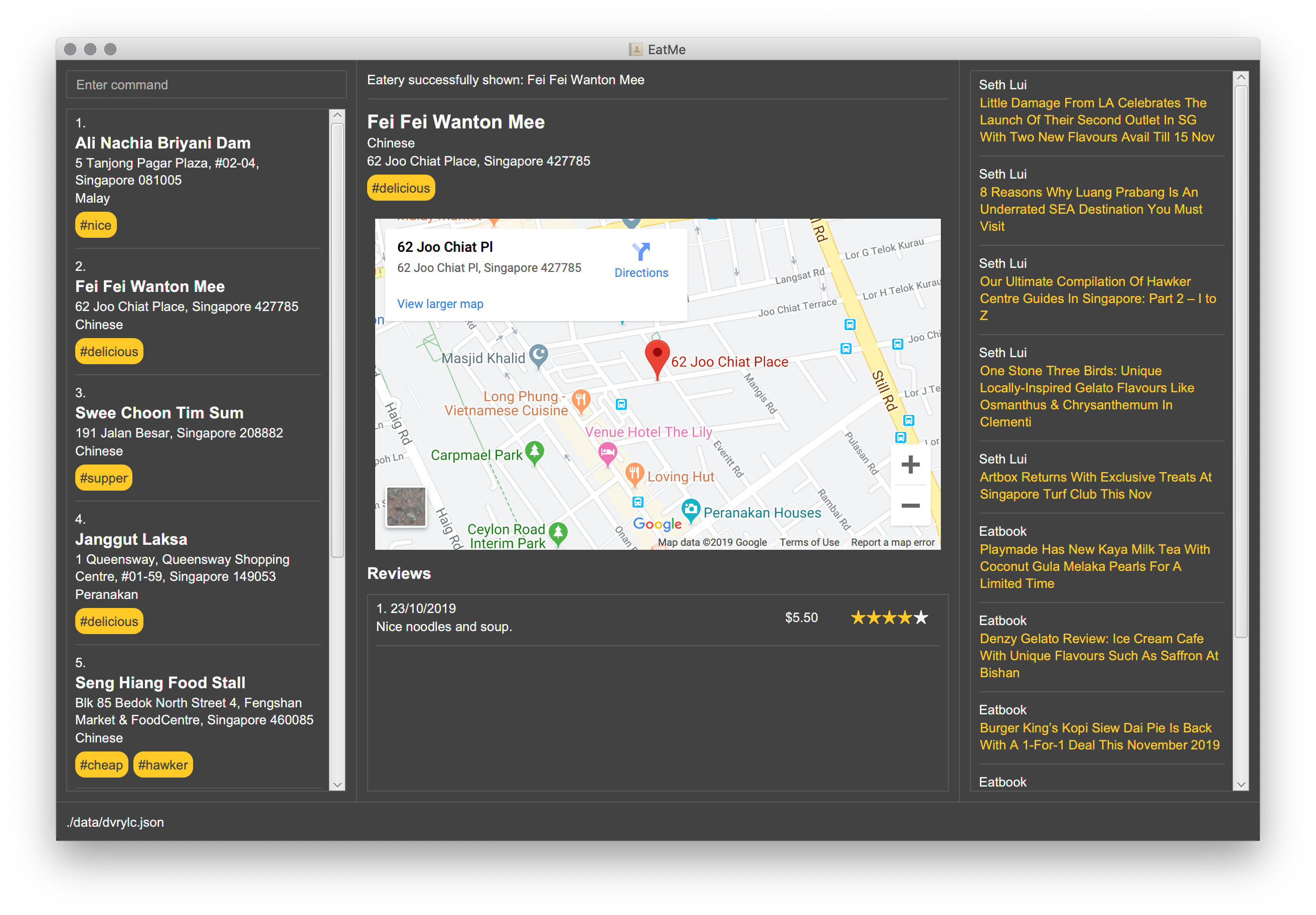
My main role is the implementation of the todo mode for EatMe. In the following sections, the enhancement will be described in more details, as well as relevant documentation from user and developer guide.
Summary of contributions
This section show summary of my contribution to the team project.
-
Major enhancement: added the ability to toggle between modes and save eatery from todo mode to main mode
-
What it does: allows the user to toggle into
todomode, allowing user to add eateries which they had yet to visit, serving as a bucket list. In addition, user will also be able to save an eatery after visiting without needing to type the whole command as the application will provide a quick way for user to fill in the missing fields. -
Justification: Through the implementation of todo mode, a user can now keep a separate list of eateries which the user wish to go. This will be useful for the user as many might wish to keep a list of eateries which they hope to visit. With Todo mode, user will be able to have a broader selection of eateries when deciding on where to go. With the implementation of the Save Command, the application had also reduced the hassle of needing to retype the whole command to record the eatery into the main list through
savecommand. -
Highlights: This enhancement affects existing commands and commands to be added in future. After implementation, the team and I now need to consider 2 different states of the application as we proceed in designing future features.
-
Credits: Both
modecommand andSaveTodocommand are based on the AB3 template provided.
-
-
Minor enhancement: Relevant updates to ui and model related to todo mode.
-
Code contributed: [Functional code] [Test code]
-
Other contributions:
-
Project management:
-
Enhancements to existing features:
-
Documentation:
-
Community:
-
Contributions to the User Guide
We had to update the original AB3 User Guide with instructions for the enhancements that we had added. The following is an excerpt from our EatMe User Guide, showing additions that I have made for the mode and SaveTodo features.
Mode Command
Allows the user to toggle between Main mode and Todo mode.
Format : mode
Example Usage:
-
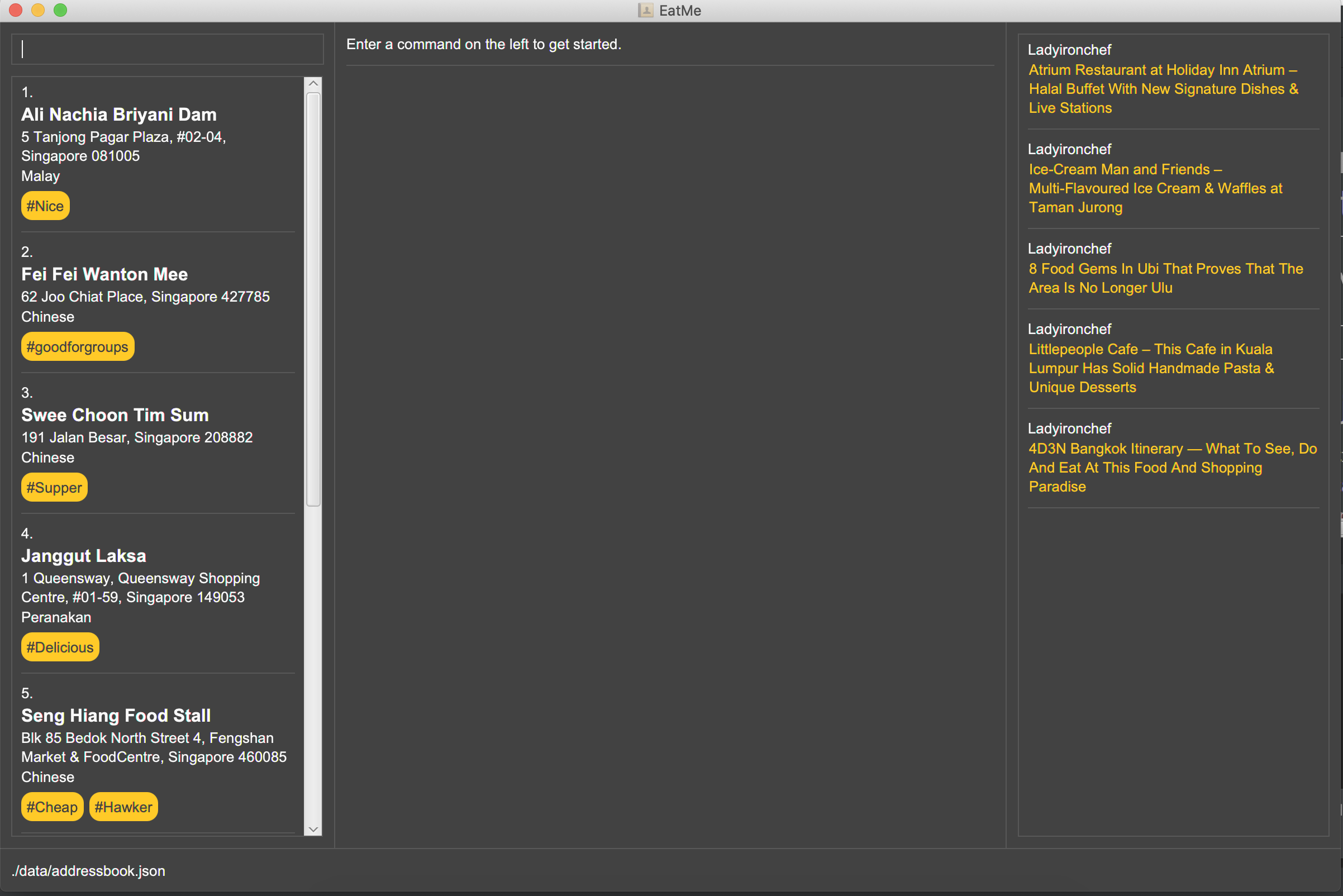
User start the application
-
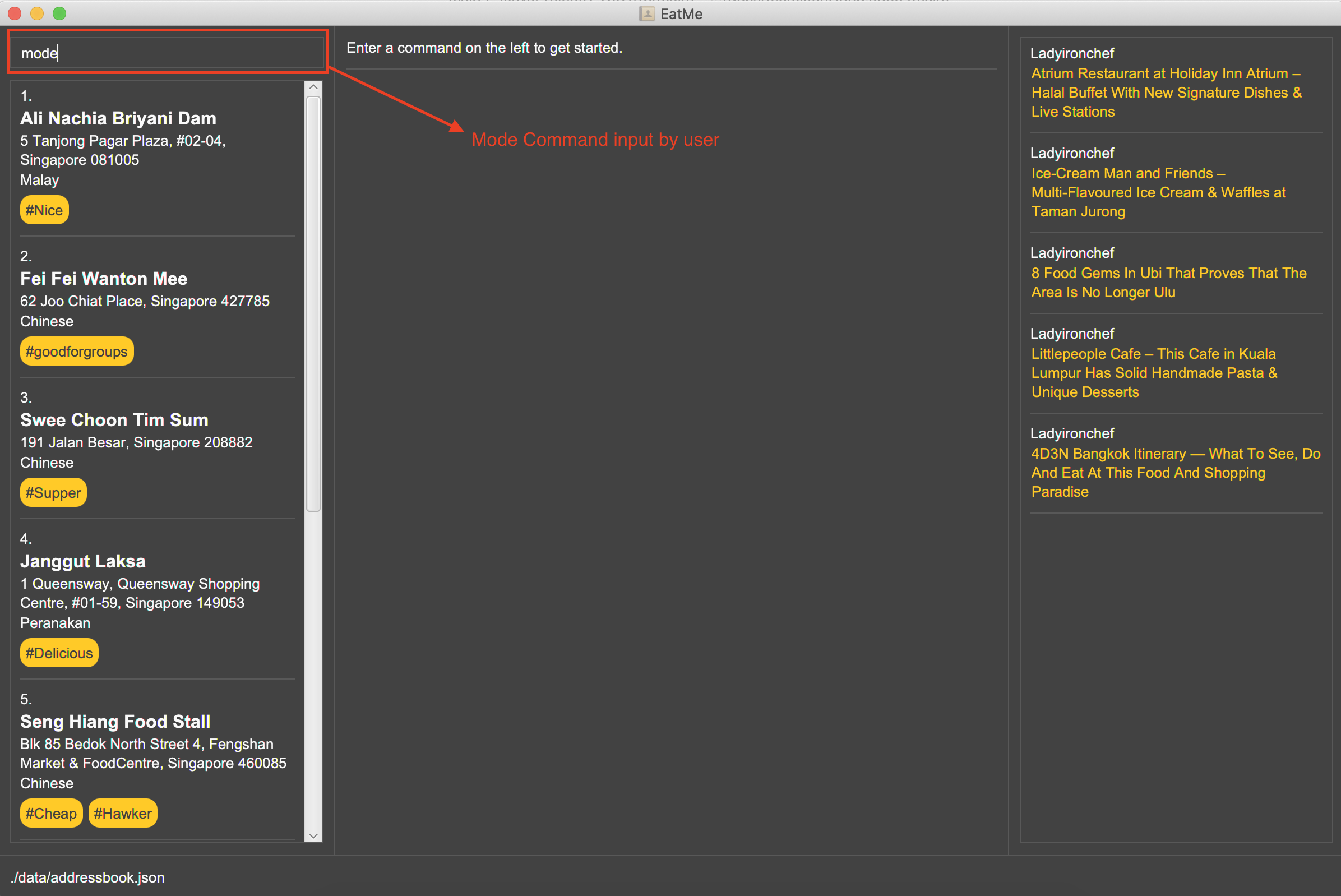
User input
mode
-
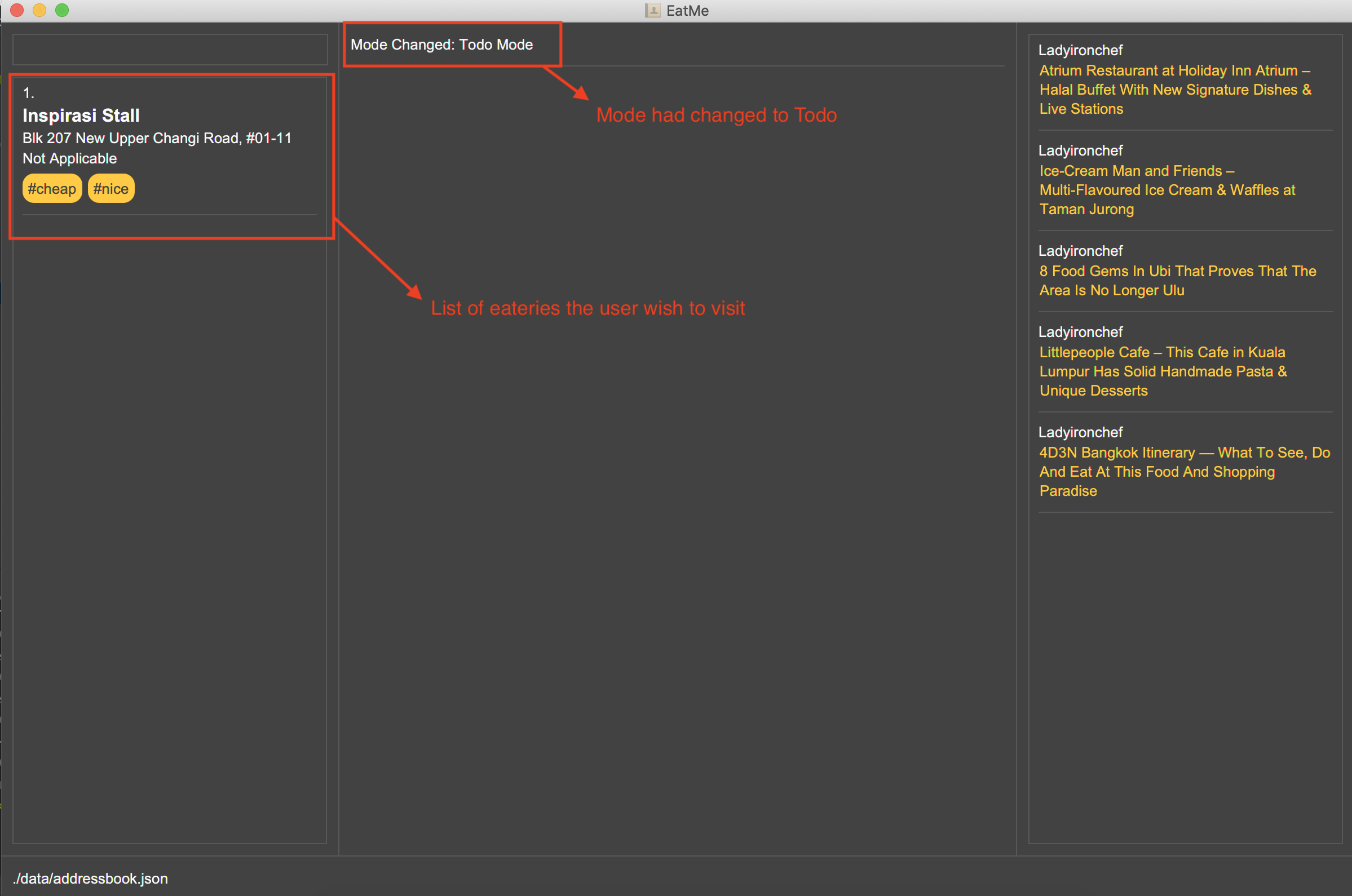
Application had switched to todo mode
SaveTodo Command
This command removes a todo eatery from the todo list and provides a quick way to add it to the main list of eateries.
Format : save
Example Usage:
-
User start the application
-
User execute
modecommand
-
User execute
savewith index of eatery he/she wanted to save.
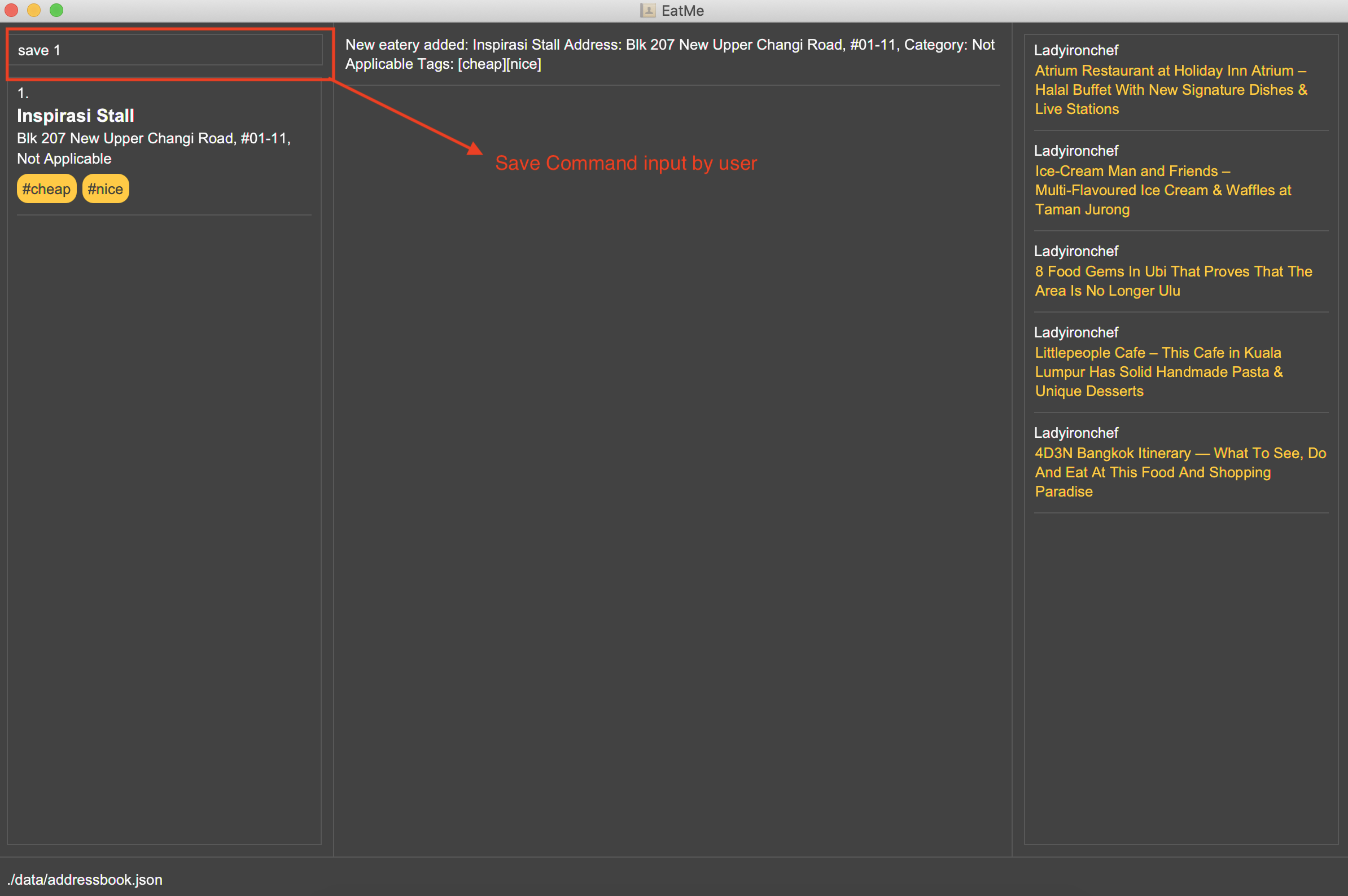
-
Application switch back to main mode, displaying incomplete command for user to finish inputting.
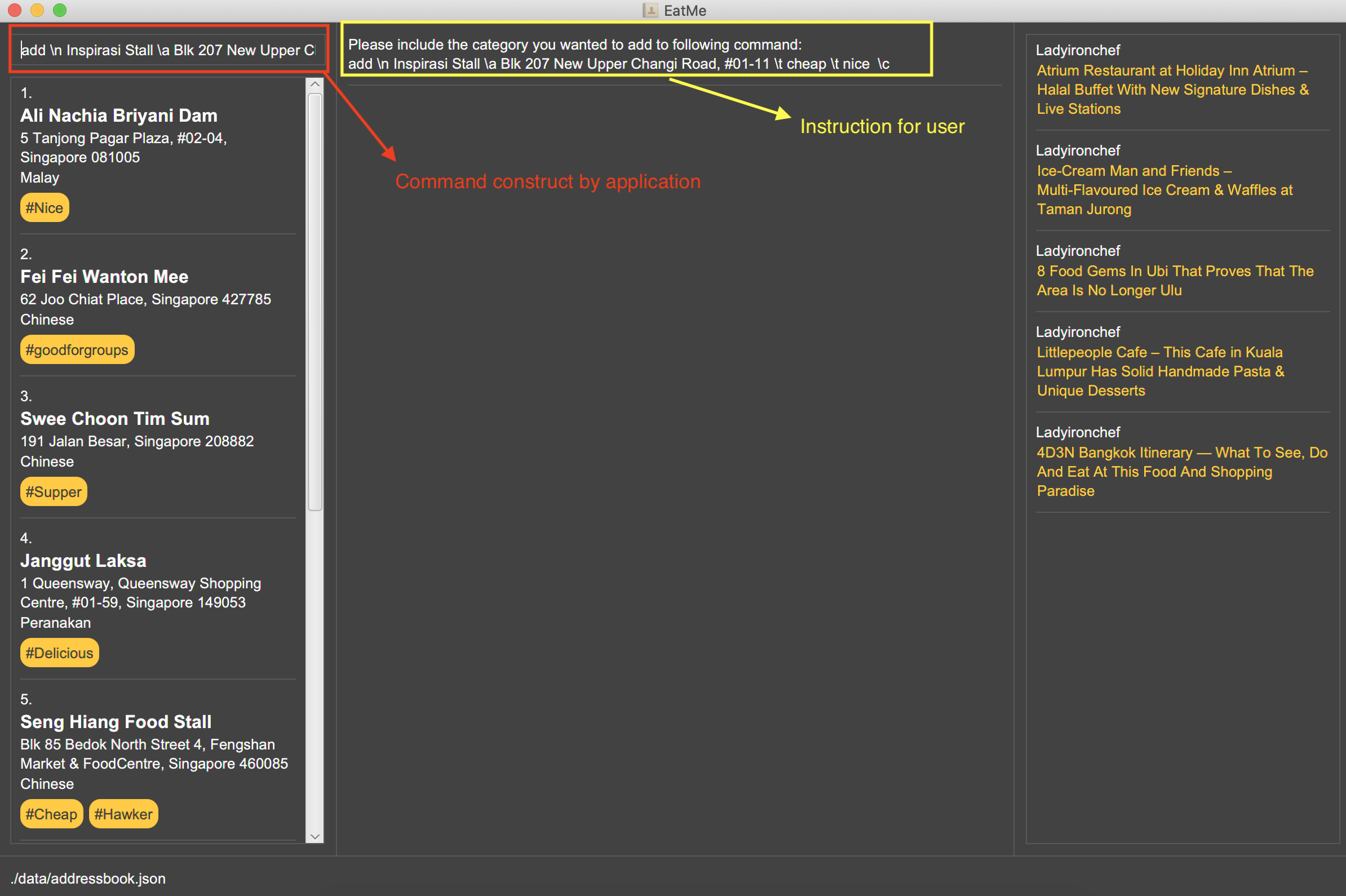
Contributions to the Developer Guide
The following section shows my contribution to the developer guide in regards to Mode and SaveTodo commands.
Mode Command
Implementation
Allows the user to toggle between Main mode and Todo mode. It extends 'Command', and once mode had been switched, will affect all other command functions. The mode is determined through the value of a boolean variable named 'isMainMode'.
Given below is an example usage of how the Mode Command behaved.
Step 1: The user launches the application. Data from addressbook will be fetched and will be initialised as Main Mode by default.
Step 2: The user execute mode command and the mode of the application will be switched to todo mode, displaying items in the todo list instead.
Step 3: The user can execute mode command again, returning the application to main mode, showing the items stored in the main list.
The following sequence diagram shows how the mode command works:
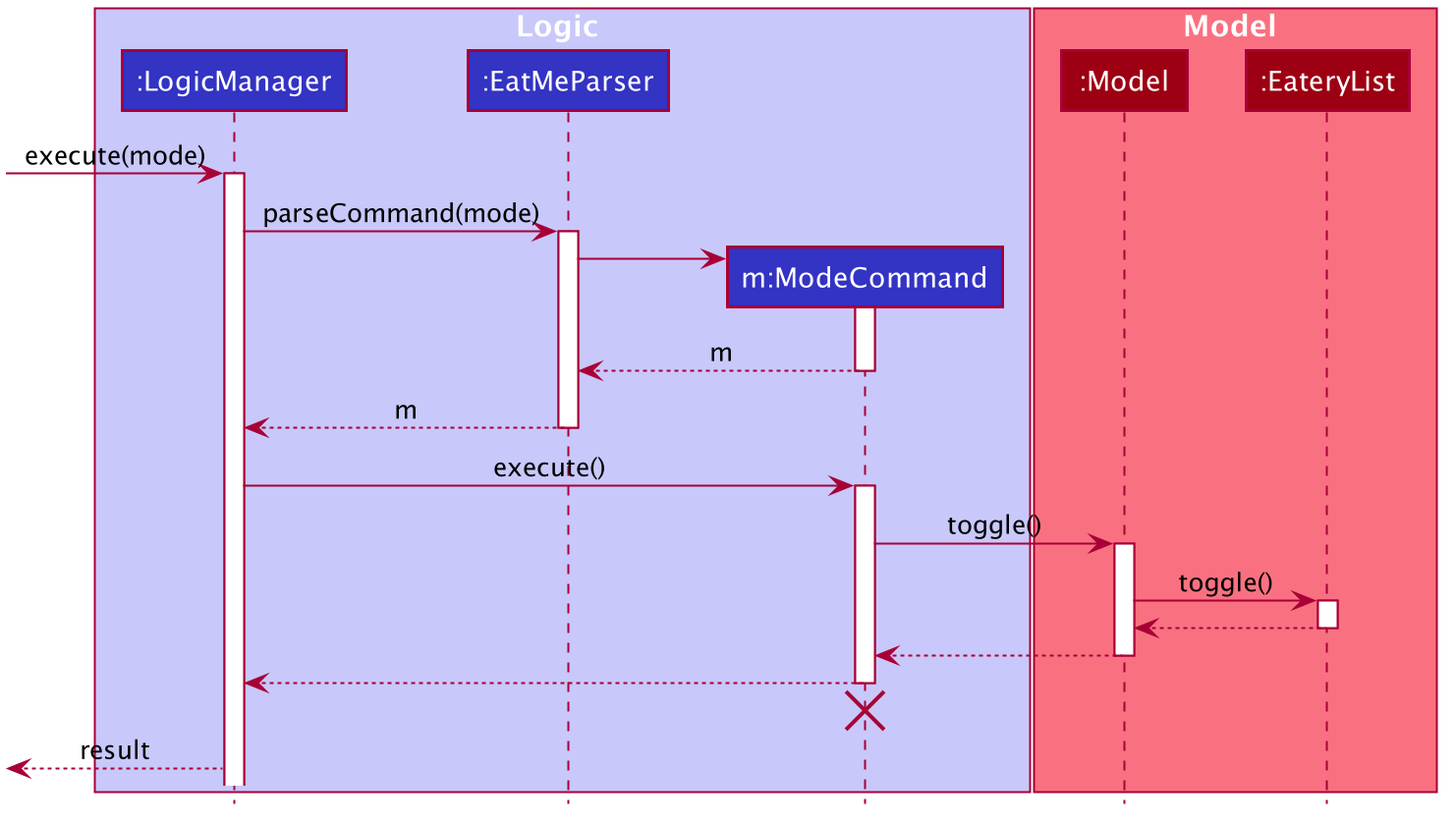
The following activity diagram summarizes what happens when a user executes a new command:
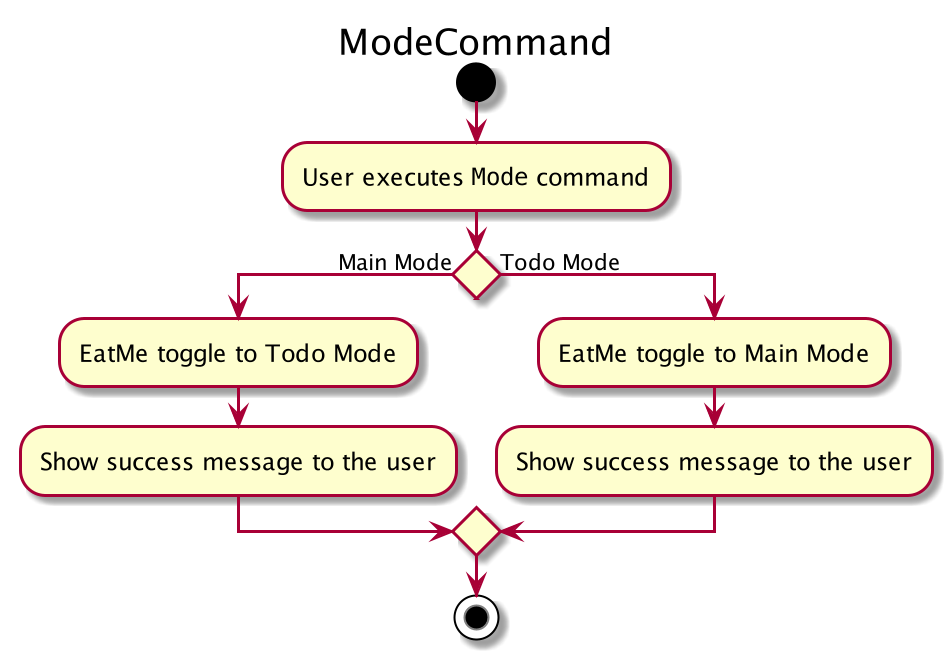
Design Considerations
Aspect: How Mode execute
-
Alternative 1 (current choice): Toggle between mode through a boolean value.
-
Pros: Easy for implementation.
-
Cons: An additional factor to check when executing any other commands; Possibility of mis-manipulation of data.
-
Aspect: Data structure to support Mode Command
-
Alternative 1 (current choice): Maintain 2 separate lists for Main mode and Todo Mode.
-
Pros: Data between the 2 modes will be separated apart. Commands executed will only affect data stored in the list for the particular mode.
-
Cons: More effort required for maintenance purposes. Need to make sure that data from main list should not go into todo list, and vice versa
-
SaveTodo Command
Implementation
This command allows the user to save an eatery from the todo list to the main eatery list. It extends 'Command'.
Given below is an example usage of how the SaveTodo Command behaved.
Step 1: The user launches the application. Data from addressbook will be fetched and will be initialised as Main Mode by default.
Step 2: The user execute mode command and the mode of the application will be switched to todo mode, displaying items in the todo list instead.
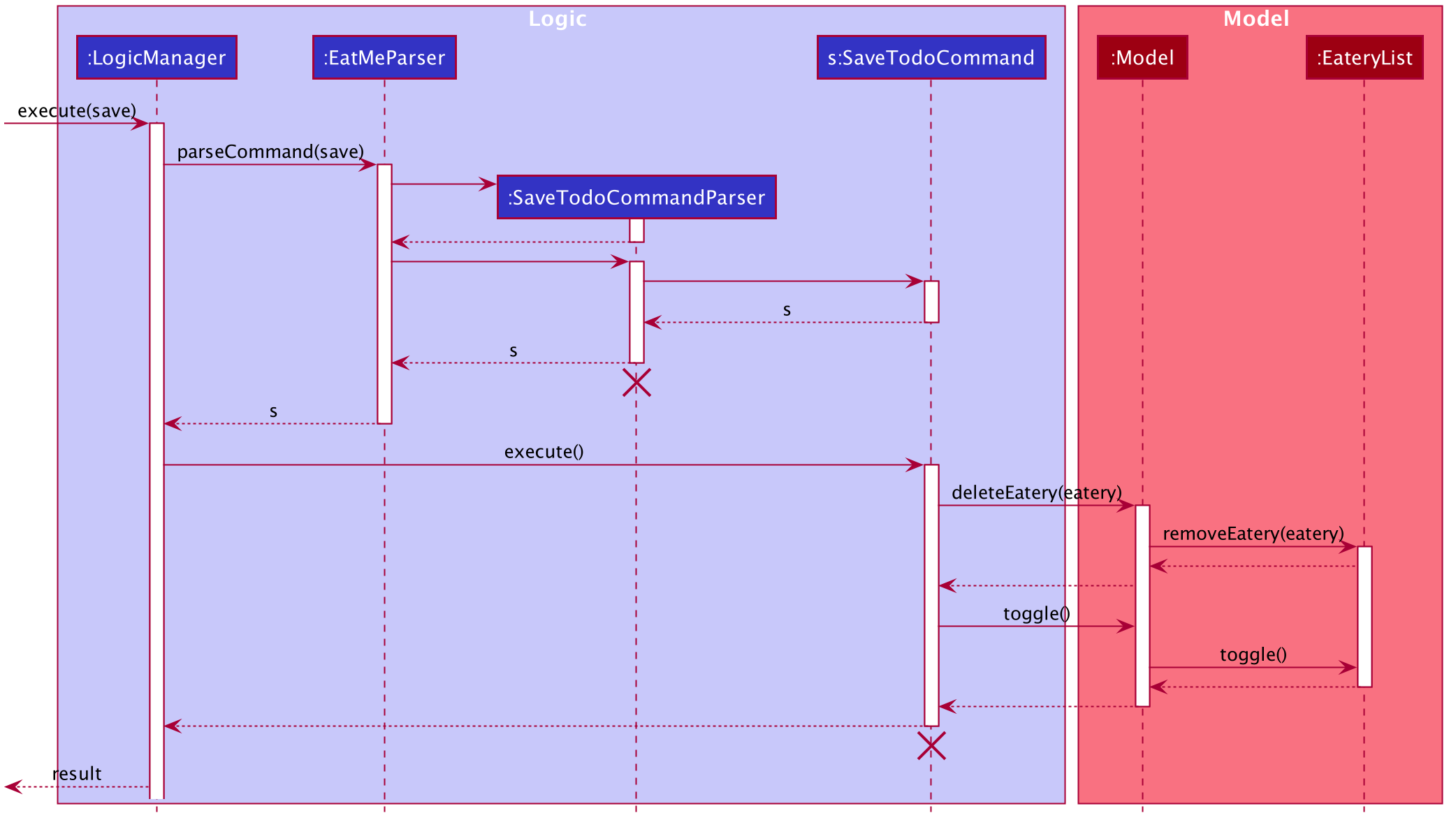
Step 3: The user can execute save 1, indicating to the system the index of eatery to be saved.
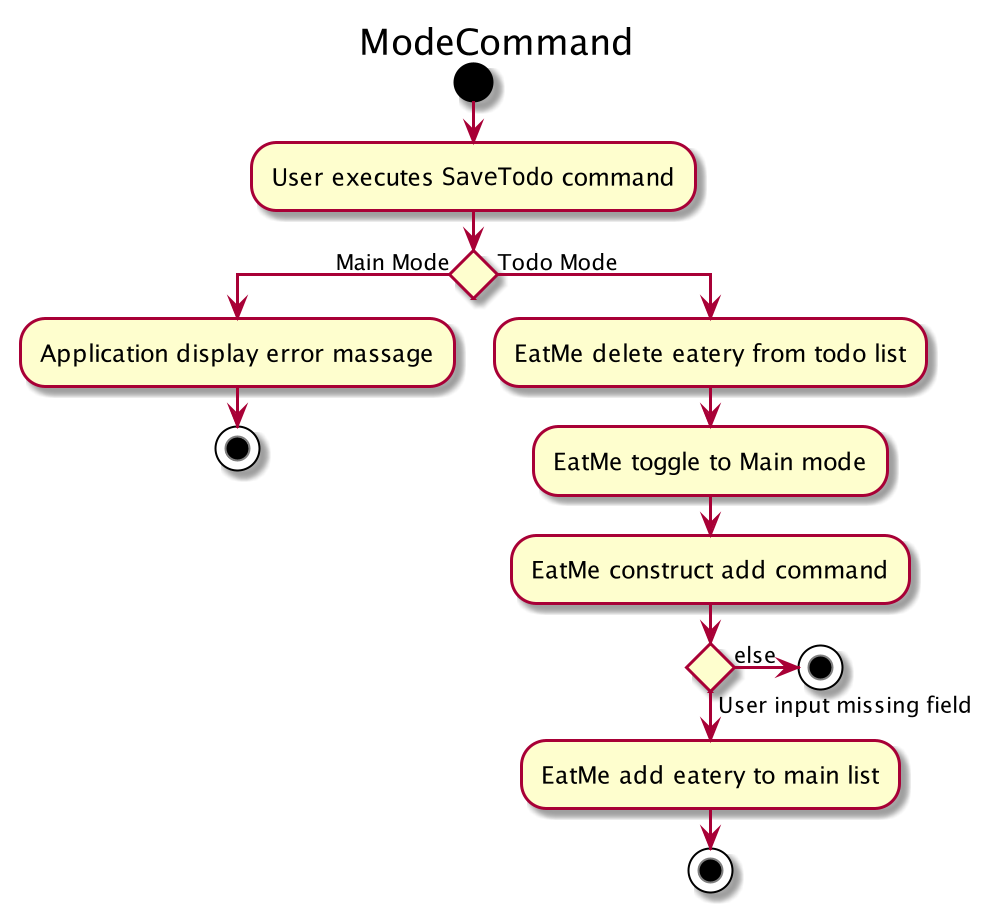
Step 4: The eatery in the todo list will be removed and an add command will be constructed in the CommandBox for user to input any necessary fields before adding.
The following sequence diagram shows how the SaveTodo command works:
The following activity diagram summarizes what happens when a user executes a new command:
Design Considerations
Aspect: How Mode execute
-
Alternative 1 (current choice): Construct the commands as a string before displaying to the user.
-
Pros: User-friendly. User will be able to add the eatery to the main list with minimum effort.
-
Cons: Unable to save directly to the main list from todo list. Possible situation can be that the user did not
addthe new eatery after executingsaveTodocommand. This situation will result in the user requiring to type the wholeaddcommand on his own as information will not be saved.
-
-
Alternative 2 Allow eatery to have the same attributes fields as eatery in main list
-
Pros: As eatery in todo list and main list have the same attributes, it will be possible to
savethe eatery directly to the main list without further input from the user. -
Cons: User will be required to include additional field when
addingan eatery in the todo list. Field entered may be irrelevant as user had yet to visit the eatery.
-
Aspect: Data structure to support SaveTodo Command
-
No additional data structure is required for
SaveTodocommand